For Children's Book Authors—About BLEED!

Contents
One phenomenon that we've seen happening quite frequently of late (late 2018-2019) is that we are seeing many authors coming to us, with completed PDFs containing fully-illustrated pages—but these authors cannot use those pages to make a print book. Why not? Because of BLEED.
What's Bleed and Why Is it Pissing in My Oat Toasties?
Bleed is the "margin of error" that a printer uses, to ensure that he's not accidentally cutting off Fido the Freewheeling Frog's head, or anything along those lines. (For more detail, please see our detailed article, "What's Bleed, and Why Is Amazon Making My Life Difficult About it?") Bleed is an extra amount of page, on all sides, that's added to all print books that have images, illustrations, or even just background colors that go to the edge of the page. You know how some books have images that sit inside the page, so that the white page surrounds it, top, bottom, and both sides, somewhat like a picture frame? That's not a full-bleed image page. When an image goes all the way to all the page edges, that's bleed. Most kids' books are full-bleed.
If you view the image, immediately below, (or on the next page) the page on the left is a regular, no-bleed page from a book. The page on the right requires bleed, because the image goes all the way to the edge of the page. Simple, right?
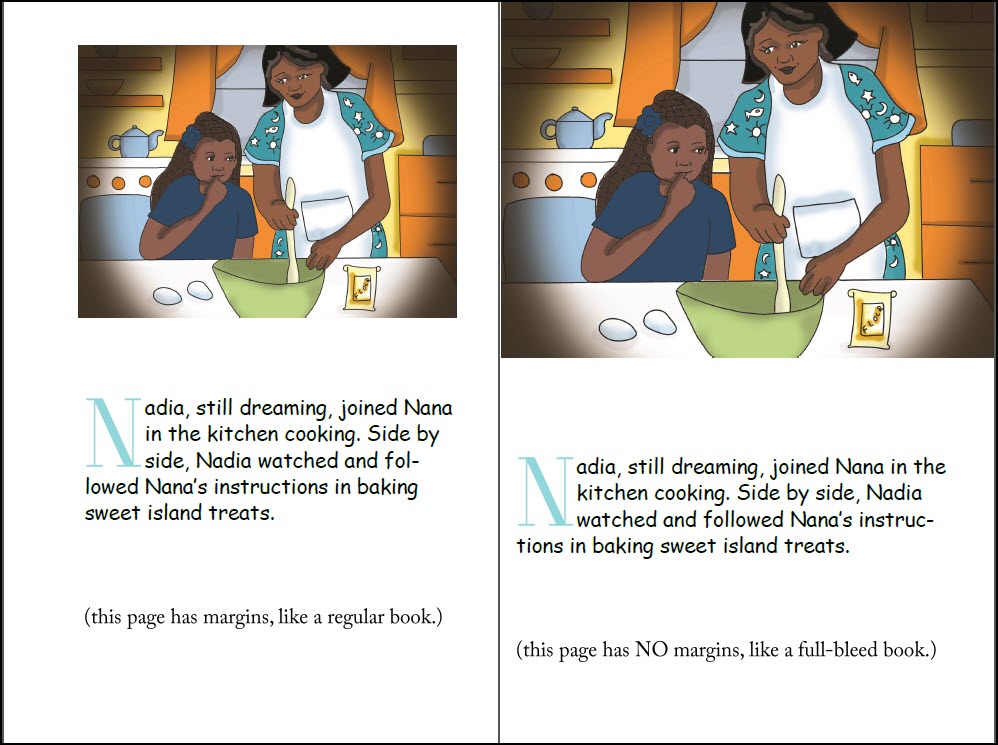
These two pages amply demonstrate no-bleed versus bleed. The page on the left doesn't need bleed--the image has margin around it. But the image on the right goes all the way to the trim edge--that page needs bleed, which means that the book it's in, requires bleed.
You can also see another potential issue here—the image on the right shows that "Mom's" head is at the very edge of the page, because that's how the illustration was drawn. The illustrator did not think about bleed, or live element areas. When this book is made, because the image has to go to the bleed edge, more of mom's head is going to be lost, when the book is trimmed. In fact, 0.125% of Mom's head. (Ooops, sorry, Mom!) When the KDP staff views this page, they might even have some issues with the fact that a chunk of "mom's" head is going to be in the Live Element area.
This is why it is incredibly important to make sure that your illustrator is experienced in making print books with bleed.
If you don't tell your illustrator what trim size you're going to print; you don't tell her what bleed and live element areas are required, she can't know how to make sure that your illustrations stay out of harm's way. It's not her responsibility to guess what you're going to do, with the book. It's your responsibility to guide her.
If you and your illustrator create your pages without paying attention to bleed, you're going to be in for a rude surprise when you go to KDP Print, IngramSpark or Lightning Source, et al, to get your book set up for print. Your file will be rejected—and then you're going to be here at our shop, asking me if we can help you. Sometimes, yes we can—but sometimes, we can't. If you and your illustrator put dialogue bubbles or other live elements too close to the edge of the fully-illustrated, full-bleed page, there's not going to be anything that we can do to help you—and that means that all the money you paid for illustrations and layout has just been thrown right out the door. You might as well have put all that money in the fireplace, and burned it up. Think I'm being dramatic? I know of at least two prospective authors who ended up losing every dime that they spent on illustrations, layout and inking. Thousands of dollars, as it happens—all wasted. Don't let this be you.
You should read up a bit more on "bleed," and what that means, here in our Publishing Center Article on Full Bleed.