Why Do My Kindle Line Heights Look So Weird?

Contents
Without seeing your precise book, it's hard to answer this, but generally, no matter what a bookmaker does, the Amazon specifications state that they want a 1.2em line-height. Now, if you don't speak Geek, that's all Greek to you, right? (Sorry, couldn't resist.) What the heck does that mean, in English?
Fido Bot Investigates!
Basically, what that means is, if we create a book with a basic font size of 12pt, the line-heights for the lines of text should be 14pt. In the trades, that's a "12/14," which means what I just said—font size at 12pt, "spacing" at 14pt. That gives the text enough "air" or spacing to be comfortably readable. Nowadays, at the time of this writing (May 2018), the Kindle Previewer 3.xx displays the line-heights in its emulations too large. Those aren't 12/14s, or 1.2ems; those are much larger, more like 12/18s or even 12/20s. To calculate what a 1.2em size means, just multiply the original font size—say, 12pts—by 1.2. You'll get 14.4. As eBook fonts and line-heights don't really work in weird sizes, round that down to 14pts, and that's about the relative line-height size that you'll get.
In the real deal, your actual, on-sale eBook, on a real Kindle, your line-heights will look more like this:
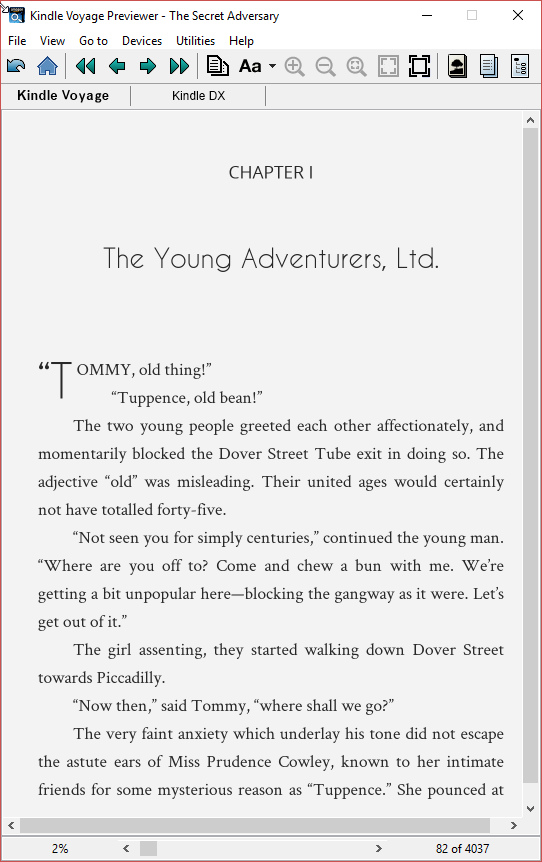
This older Kindle Previewer, 2.9.xx, is more demonstrative as to how the real devices will look, in line-heights. As you will see when you open your own Kindle Previewer, 3.xx, the line-heights will look MUCH larger. But on the real devices, they will look about like this.
If you're worried about your line-heights, just ask us, but chances are, they're fine.
Amazon Requirements:
Even if you asked us to make the line-heights larger for the bulk of your body text, Amazon will override those. We've had any number of clients that have asked us to make a double-spaced line for them, essentially, or a 1.6 or 1.8em line-height. We can do that, and we can hand you a MOBI file that will look like you've requested. But here's the thing—when you upload it at the KDP, Amazon will override what we've set, and change it back to the 1.2em line-height discussed and shown above. Now, don't get me wrong—we can make short sections of text smaller or larger, etc. But for your body font, Amazon wants that 12/14 setting, as discussed above.
Don't let other formatters fool you, saying that they can do this or that. As I said, sure, we can give you a MOBI that looks like you think you want—but when you upload it, it will be changed. We don't believe in misleading our customers, or letting them have an unpleasant shock later. We give you what Amazon will allow the book to look like in its final form.