Why Do My Headings/Subheadings Show up at the Bottom of a Page?

Contents
That’s because there’s no such thing as a page. I know, I know—you’ve heard that before, but the idea is hard to grasp, isn’t it? Especially when even formatters talk about pages.
To get a better idea of how eBooks work, look at the image below (or following page). The top of the book starts…and then, the narrative or story comes out, in a rolling fashion. It goes on and on, until it hits the end of the roll. Unlike that roll, the “sheets” don’t exist. We (the bookmakers) create the tops/bottoms of chapters, by using some HTML methods—but the rest just rolls on. That means that it doesn’t “see” that a subheading starts at the bottom of a page; the page doesn’t exist. The person reading it could change the font size, and then, that same subheading would be in the middle of that same screen—or the top or middle of the next. Wild to think about, right?
There are no pages—no tops, no bottoms—so from the device’s perspective, that subheading isn’t at the bottom of a page. It’s simply coming in sequence, as it’s supposed to.
To understand, it helps to think about the beginning, middle and end of an eBook like a roll of toilet paper. (In the reverse way that it comes off the roll, but please stick with me here). Or one of those public bathroom drying towels, the cloth ones. On and on and on…
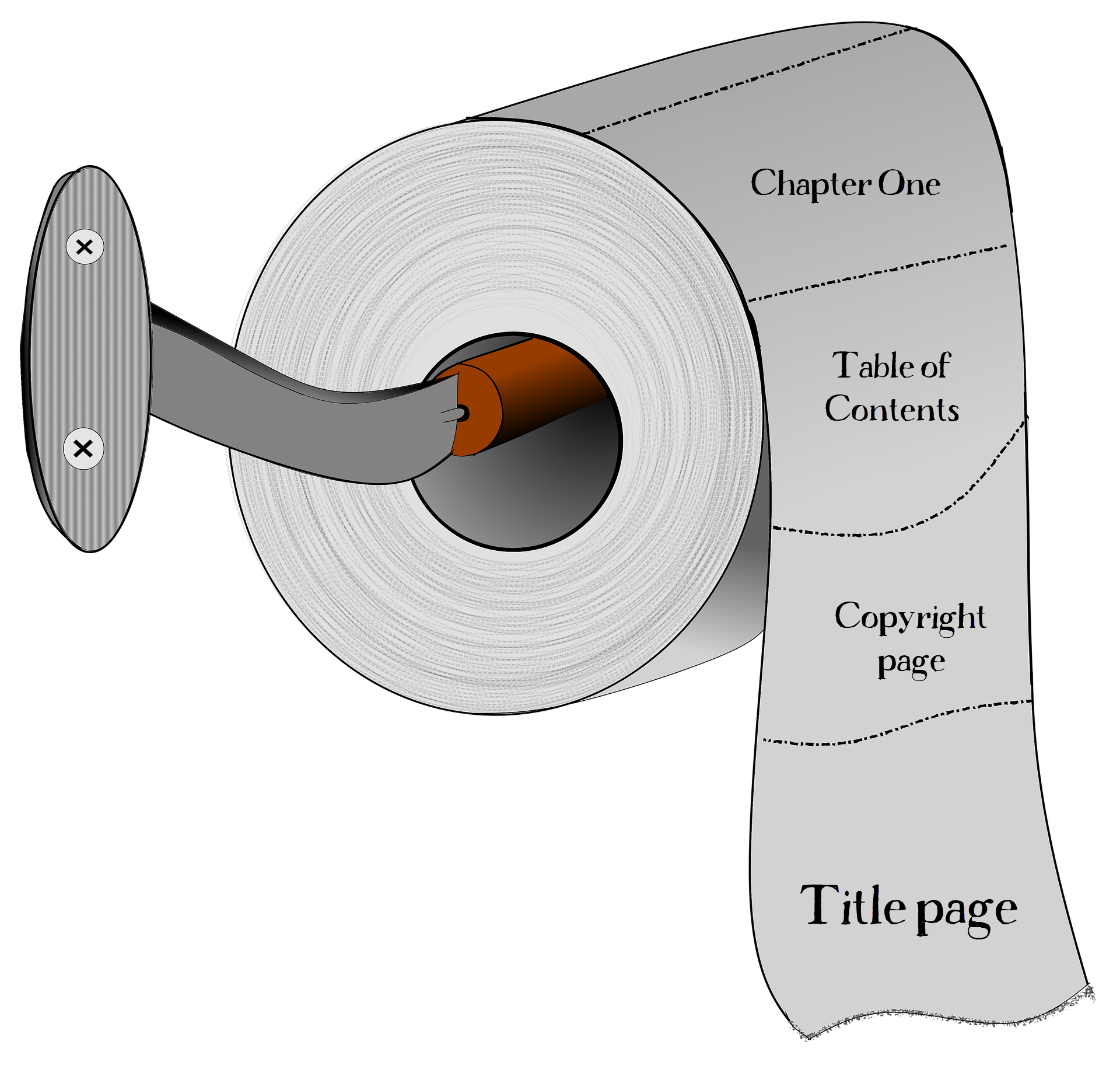
Think of the dotted lines as not being visible--being created by what we do, in the HTML, to make the individual sections or chapters appear to be "pages." But they don't, in reality, exist. The content scrolls down, or sideways, or through, the eReader, and everything that makes it appear to be a "page" is done via coding or via the device's programming.
Every time the font, font face, font size, margins, etc., are changed, that subheading moves. It could be at the bottom of the screen, the middle of the next, etc. Just play with the font sizes, and you’ll see that for yourself. (Check out our tutorials, on viewing your eBooks in Kindle Previewer, or Adobe Digital Editions, to see what I mean.)
In our imaginary roll of toilet paper, above, the dotted lines don't exist. Inside a chapter, they don't even pretend to exist—so, that header you're worried about could move from one screen, to the next, by the switch of a font face, or the font size, or just because Suzie rotates her device, on the bus, to read the book in landscape. All of these things are out of your (and our!) control.
So: nope, there’s not a thing we can do—not without ruining the book!—to “fix” the location of that sub-header. That’s because it’s not broken; it’s working the way it’s supposed to.