Using the Bookmarks Menu in this PDF

Contents
Many people don't know that PDFs have a built-in TOC, with fully-clickable links, that you can open and keep open the entire time you're browsing through that PDF. This file has that, too.
In the image below, you can see the interactive "Bookmarks" TOC engaged and working, while a PDF version of this manual is open. All you have to do is click the "Bookmarks" icon (the ribbon icon) and it will display. You can expand the items, by clicking the "+" or ">" next to a category or topic, and click any item you see. It makes browsing the PDF and finding items quite fast!
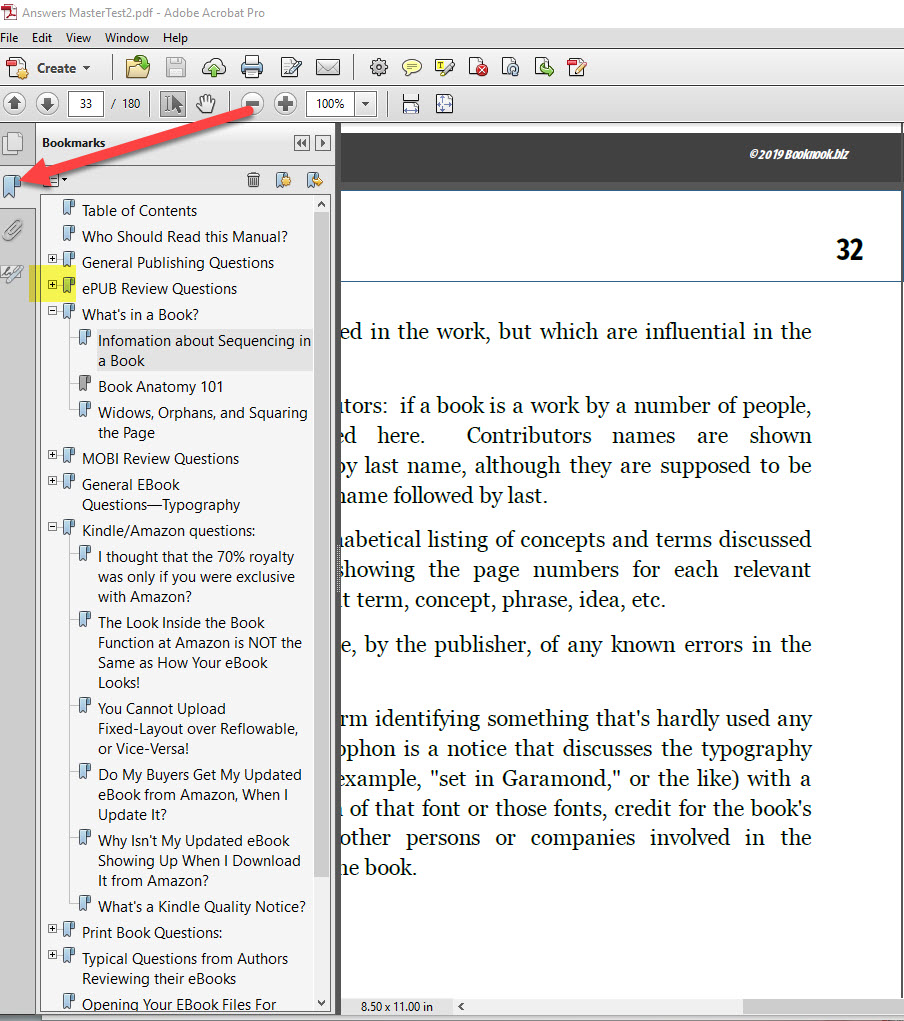
This shows you the PDF "Bookmarks" Table of Contents, there on the left. Simply click the ribbon (bookmark, get it?) and this will display. You can click the ribbon again to close it. Each item can be clicked, and jumped to; you can also expand categories or master topics by clicking the "+" that you see in the image, highlighted in yellow.
And an index, too!
There's an index at the rear of the manual—you can jump to any item by clicking its associated page number, rather than the text of the item. So, if you see "Look Inside, LITB, Look Inside the Book Function, Amazon's Look inside, by book looks terrible on the Look Inside 91" you need to click the 91, not the text. Will take you right there.